
Untangling Your Data
How to naavigate safely out of the spreadsheet data mess

For the sake of this post, we assume that to run your business, you have been using spreadsheets, documents, emails and perhaps other files. We also assume that your business is about project-based services, where you track project details, tasks, materials used, progress, etc.

Initially, loose files and documents seem to work, but over time the limitations of this approach will become apparent.
There is a better way, and it is not very complex, and it can be customised to your operations: a simple database that holds securely all your data: projects, clients, tasks, progress and more.
What Is a Database?
Imagine a database as a super-organised digital filing cabinet.
Instead of having hundreds of spreadsheets and documents scattered across folders (like a messy desk), a database keeps all your business information in one place, neatly linked together.
It’s like upgrading from a shoebox full of receipts to a well-labelled, searchable system where everything is connected.
Key idea:
A database stores information in tables (like spreadsheets), but with one crucial difference: the tables can talk to each other. For example:
A “Clients” table can link to a “Projects” table, which links to an “Invoices” table.
This means you can find, update, or analyse information instantly without jumping between files.
How Does It Work?
Think of a database like a library. Spreadsheets are like having hundreds of loose papers-some in folders, some on your desk, some in drawers. Finding what you need takes time, and it’s easy to lose or duplicate things.
A database is like a library where:
Every book (or piece of data) has a specific place.
The catalog (the database system) lets you find anything in seconds.
If you update a book’s location, the catalog updates automatically-no manual searching or rewriting.
Example:
In a spreadsheet, you might have a list of clients in one file and their projects in another. If a client’s email changes, you have to update it in every file.
In a database, you update the email once, and it’s corrected everywhere - projects, invoices, notes - automatically.
Why Is a Database Better Than Spreadsheets?
A. No More Copy-Paste Hell
Spreadsheets: You copy client details from an email, paste them into a project spreadsheet, then copy them again for an invoice. If the email changes, you have to remember to update all three places.
Database: Enter the email once. It’s automatically linked to all projects, invoices, and notes. Update it in one place, and it’s updated everywhere.
B. Find Anything in Seconds
Spreadsheets: Need to find all projects for “Client X”? You might have to open 10 files and search manually.
Database: Type “Client X” into a search bar, and all their projects, invoices, and communications appear instantly.
C. Stop Wasting Time on Errors
Spreadsheets: Typos, broken formulas, or deleted rows can cause costly mistakes (e.g., incorrect invoices or missed deadlines).
Database: Built-in checks prevent errors. For example:
It won’t let you assign a project to a client who doesn’t exist.
It can flag overdue invoices or conflicting schedules automatically.
D. Grow Without the Chaos
Spreadsheets: As your business grows, files multiply, slow down, or crash. Ever opened a spreadsheet and seen “Not Responding”?
Database: Handles thousands of records smoothly. Add new clients, projects, or team members without breaking a sweat.
E. Work Together Without Confusion
Spreadsheets: If two people edit the same file, you end up with conflicts (e.g., “Which version is the latest?”).
Database: Everyone sees the same up-to-date information. No more emailing files back and forth or overwriting each other’s work.
F. Get Answers to Big Questions
Spreadsheets: Answering “Which clients bring in the most profit?” might take hours of manual work.
Database: Click a button to generate reports like:
“Show me all overdue invoices.”
“Which projects are behind schedule?”
“How much revenue did we make last year?”
Below we will explain some of the long-term benefits of this approach.
Core Benefits of a Database
1. Single Source of Truth
Problem with spreadsheets/documents: Data is scattered across files, versions conflict, and updates are manual (error-prone).
Database advantage: All data lives in one place, updated in real time. Everyone sees the same, accurate information.
- Example: Client contact details, project status, invoices, and communications are linked and consistent.
2. Automation & Efficiency
Problem: Manual data entry, copying/pasting between files, and recreating reports waste time.
Database advantage: Automate repetitive tasks (e.g., invoicing, status updates, reminders). Set rules to trigger actions (e.g., “When project status = ‘Completed’, send invoice”).
- Metric: Save 10+ hours/month on admin tasks.
3. Scalability
Problem: Spreadsheets break as data grows (slow, crashes, unmanageable).
Database advantage: Handles thousands of records without performance issues. Add new projects, clients, or services without restructuring.
- Example: Adding 100 new clients? No need to create 100 new files or tabs.
4. Relationships & Insights
Problem: Spreadsheets can’t easily show relationships (e.g., “Which clients are late on payments and have open projects?”). Technically, it is possible to link workbooks and spreadsheets, but this gets out of hand quite quickly, and a database is designed for that type of work: linking data where it makes sense.
Database advantage: Link data tables to answer complex questions instantly. Generate reports like:
Profitability by client/project type
Resource allocation across teams
Trends in project delays or budget overruns
5. Security & Access Control
Problem: Sharing spreadsheets via email or cloud links risks data leaks or accidental edits.
Database advantage: Role-based access (e.g., clients see only their projects; admins see everything). Audit logs track who changed what.
6. Collaboration
Problem: Team members work on different file versions, leading to confusion.
Database advantage: Real-time collaboration with conflict resolution. Notifications for updates or tasks.
7. Integration
Problem: Spreadsheets are siloed; data must be re-entered into other tools (e.g., accounting, CRM, reporting).
Database advantage: Connect to other systems (e.g., auto-sync with QuickBooks, Slack, or calendars).
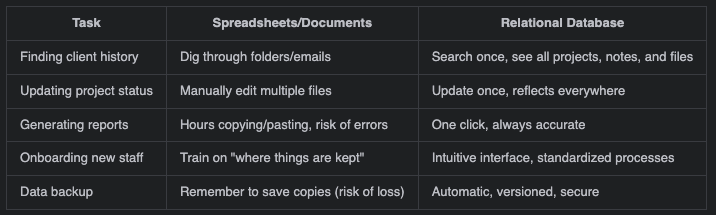
How much time/money do you lose each month on these tasks?
How much time do you spend every week searching for files, updating multiple spreadsheets, or fixing errors? What if you could get that time back?
You might have other objections. For example, spreadsheets are free, but what is the cost of errors, lost time, or missed opportunities? Introducing the simple concept of a database (and building it correctly) will prevent chaos later on, because migrations get harder as you and your data grow. Modern databases (and they’ve been around for decades) have user-friendly interface and are easy to extend with custom functionality that will suit your needs.
As an example, instead of hundreds of spreadsheets, we could have all our data organised in tables:
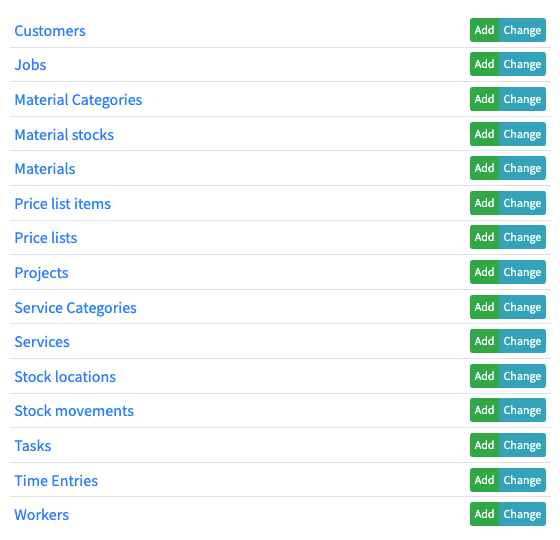
Once you have a database, it is easy to update all the data, track progress, build reporting, alerts and more. You could even use some of the spreadsheets, if you like, but we know you’d see the benefits of moving towards a database solution.
A database isn’t just an upgrade - it’s insurance against chaos as you grow. The question isn’t whether you can afford it, but whether you can afford not to.
Ready?
A database isn’t just an upgrade - it’s a foundation for clarity, efficiency, and growth. If you’re done wrestling with spreadsheets and ready for a system that works with you, not against you, let’s make it happen.
Explore How a Database Can Work for You
Tell us about your workflow, and we’ll show you how a custom database can simplify it.